


ZCut — free software for live events: Studio Plus live video switcher, ZCut Int intercom and tally, Creator Studio photo proofing

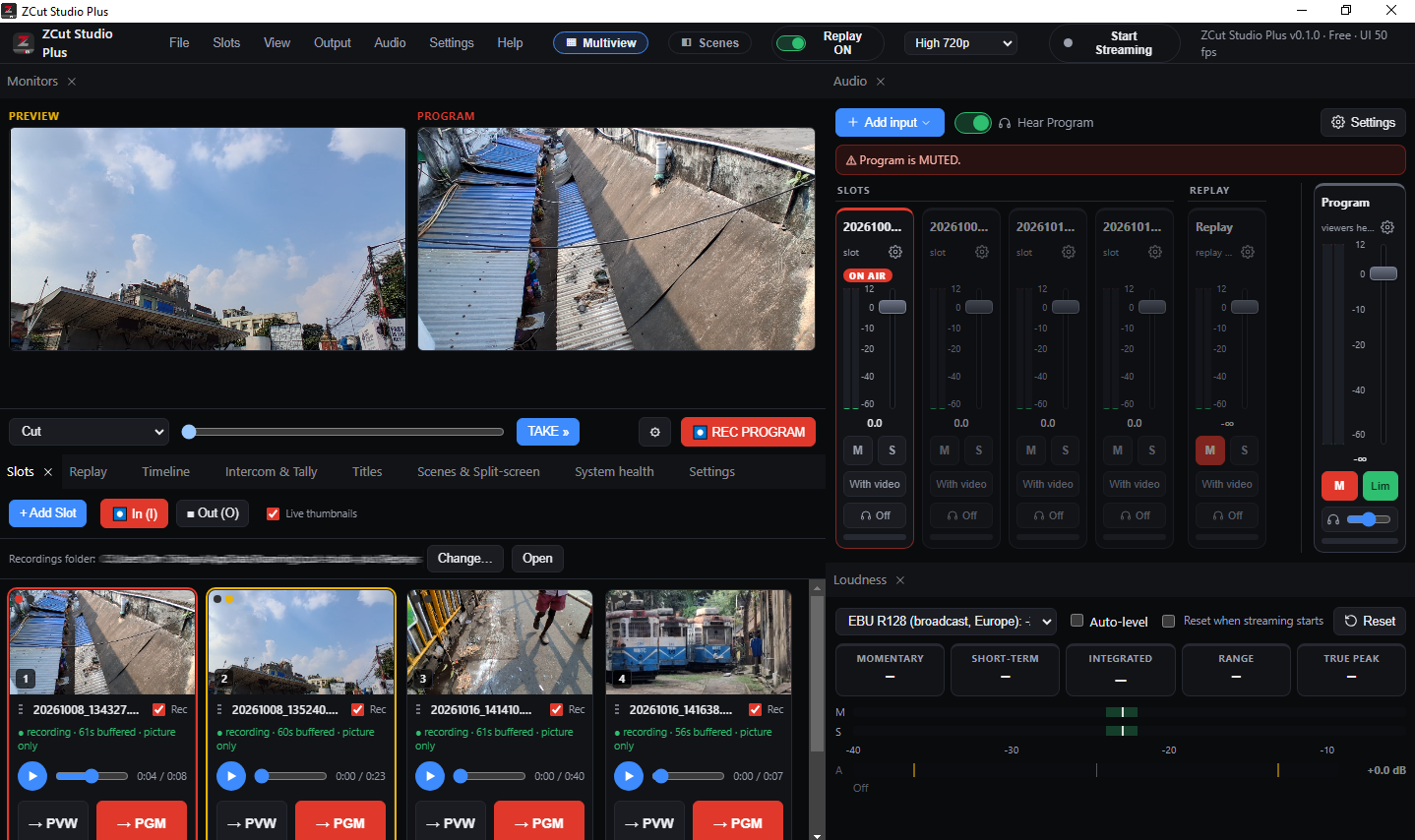
ZCut Studio Plus window showing Preview and Program monitors, source slots, audio mixer and loudness meter
ZCut Studio Plus Live Video Switcher

Run a live show from one Windows PC — switch cameras, replay moments, stream to YouTube & Facebook.

100% FREE · no account · no watermark · no time limit
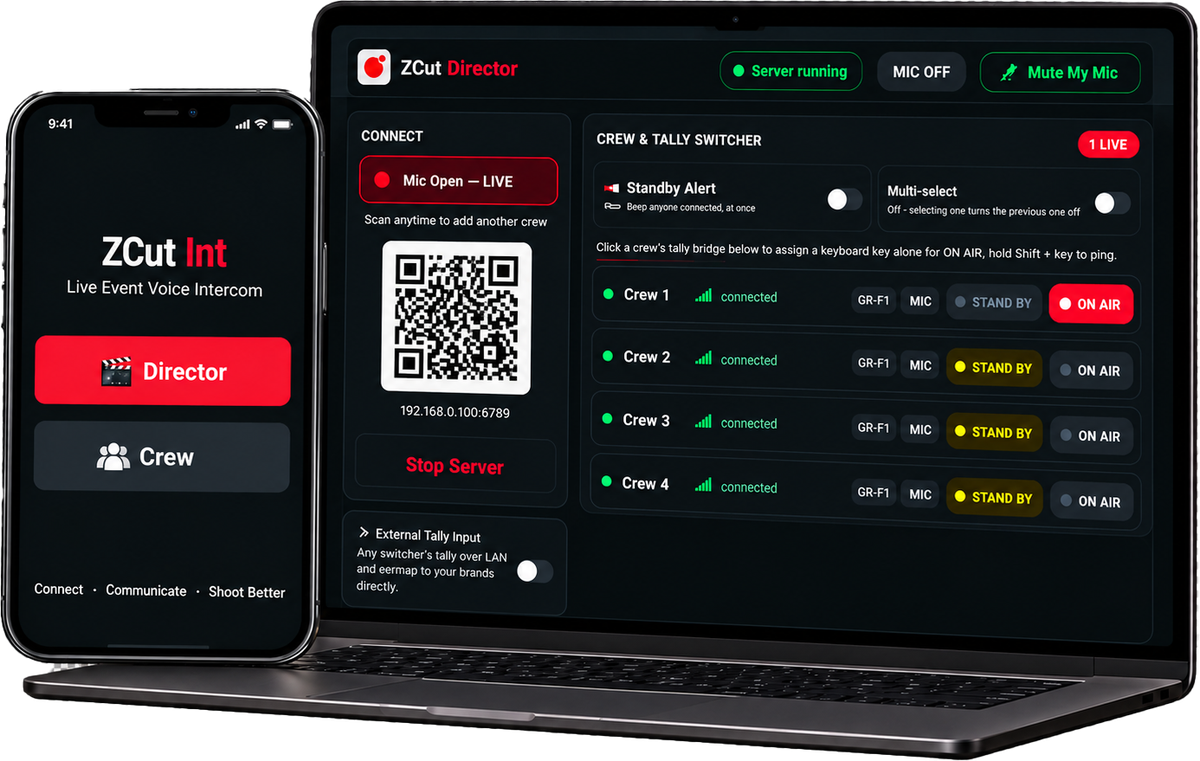
ZCut Int on a phone and ZCut Director on a laptop showing crew tally with Standby and On Air buttons
ZCut Int Intercom & Tally

Talk to every cameraman and see who's live — over your own local WiFi, no internet needed.

FREE Cameraman app · free 7-day Director trial · no credit card
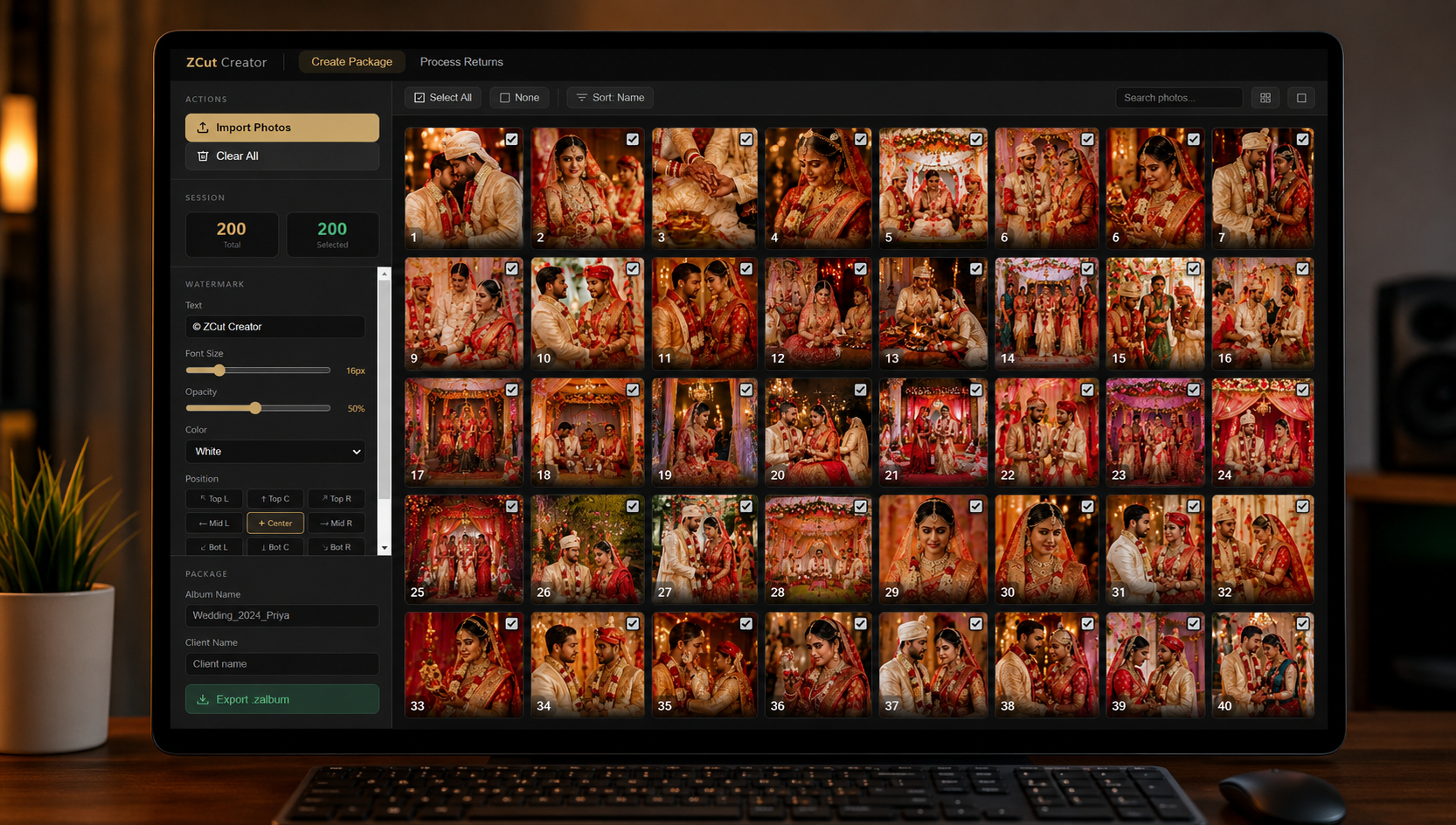
ZCut Creator Studio desktop app showing a grid of wedding photo thumbnails with watermark and export controls
ZCut Creator Studio Photo Proofing

Watermark your shoot, send it over WhatsApp, get client picks and notes back for your album designer.

100% FREE · no account · full-resolution handoff included
Product 01 · Free for Windows

ZCut Studio Plus

Your whole live production desk — in one free Windows app.

Built for the way a live show actually runs. Switch cameras, screens and files, replay the moment that just happened, mix your audio and stream — all from one PC, in one window you can rearrange or spread over two monitors. Every feature is included. Nothing is locked.

01 — Switching

Every source gets a slot — and its own shortcut key

Cameras, screens, windows, video files and URLs each sit in their own slot. Press a key to send it to Program, or hold Shift to stage it on Preview first — just like a real broadcast switcher.

  • Unlimited source slots — no cap, no paywall
  • Hard Cut, or a manual T-bar for dissolves, wipes and pushes
  • Live thumbnails so you always see what each source is doing
02 — Replay

Press I when it happens. Press O when it ends.

Never miss the moment again. Mark the start and end of anything that just happened and ZCut builds a replay take that includes a clip from every camera.

  • Cue it, slow it down, and send it to air
  • Per-camera recordings run in the background, buffered and ready
  • Record the Program output to disk while you stream
03 — Audio

A real mixer — faders, meters, mute, solo and a master limiter

Balance every microphone and camera feed from one panel. Each source has its own fader and meter, and the master output has a limiter so a loud moment never clips.

  • Mute and solo on every channel
  • Hear Program monitoring through your headphones
  • Full audio processing included — no add-ons
04 — Loudness

Broadcast-grade loudness, following EBU R128

Deliver a stream that sounds right everywhere. The loudness meter follows EBU R128 and shows momentary, short-term and integrated loudness, range and true peak.

  • Auto-level option to keep loudness on target
  • Reset the meter automatically when streaming starts
  • Pick the standard that fits your broadcast

Stream everywhere

YouTube, Facebook, Twitch, Restream, or any RTMP / RTMPS / SRT address. ZCut encodes once and sends to every destination, so extra destinations cost very little CPU.

Titles & timeline

Unlimited title layers and scrolling tickers, a timeline editor with export, plus autosave and session files so nothing gets lost.

Intercom & tally

Intercom and tally for your camera operators built right in — and it pairs with ZCut Int for the whole crew.

Your window, your way

720p or 1080p Program canvas, HDMI or second-screen full-screen output, and a layout you can rearrange or spread across two monitors.

Free to download & use
Unlimited source slots
Every feature included
No account · no watermark · no time limit

Needs Windows 10 or 11 (64-bit). A modern four-core PC handles a few sources at 720p; a graphics card with NVENC, Quick Sync or AMF lowers the CPU load of streaming. If paid features ever arrive, they will be announced beforehand and the version you have keeps working.

⬇ Download ZCut Studio Plus — Free
Windows 10 & 11 · 64-bit · studioplus.zcut.in
Product 02 · Free Cameraman app

ZCut Int

Talk to every cameraman. See who's live.

A WiFi voice intercom and tally system for wedding and live-event video teams. The director calls the shots; the cameramen just connect. It runs on your own local WiFi at the venue — no internet, no SIM, no data cost — and keeps your voice and tally data on your own network.

ZCut Int on a phone and ZCut Director on a laptop showing crew tally with Standby and On Air buttons and a QR code to join
01 — The Director

One screen to run the whole crew

The Director runs on a Windows PC (or on a phone, with manual tally). Cameramen join by scanning a single QR code — then you see every crew member, their connection, and who is on air.

  • Scan to join — add another cameraman any time
  • Standby alert — warn one camera, or the whole crew, before a cut
  • Keyboard shortcuts for ON AIR and STAND BY on the PC version
  • Mute your own mic with one click
02 — The Cameraman

Tally that means something — even in a bright hall

Cameramen open the free app, choose Crew, and they're connected. When you cut to them, their whole phone screen glows ON AIR; when they're next, it glows STAND BY — readable in bright daylight or a dark banquet hall.

  • Clear voice over WiFi, tuned for noisy stages and banquet halls
  • A signal-quality indicator so you know the link is healthy
  • No seat limits — the cameraman app is free, always
03 — Your switcher

Reads tally from the switcher you already use

Turn on External Tally Input and ZCut Int reads the tally straight from your switcher over the LAN and maps it to your crew — no one has to press a button.

  • vMix, Blackmagic ATEM, OSEE GoStream, Roland V-Series
  • TSL 3.1 / 5.0 compatible switchers, plus Ross, Streamstar and FOR-A
  • A universal GPI tally box is coming soon
  • Manual tally needs no switcher and no extra hardware

What you need

One single-ear earphone per person, and a dedicated router for anything bigger than a small room. Small rooms can use the Director's own hotspot.

Software only

ZCut Int does not manufacture, bundle or sell hardware. It's an app on the phones and PC you already own.

Try before you buy

The cameraman app is free. The Director has a 7-day free trial, no credit card — current licence pricing is on zcutint.zcut.in.

⬇ Download ZCut Int — Free
Cameraman app free · Director 7-day free trial · zcutint.zcut.in
Product 03 · 100% Free for Windows

ZCut Creator Studio

Proof, pick & hand off — for wedding photographers.

Watermark and package your shoot, send it over WhatsApp, get your client's picks and notes back, and hand a ready-to-design album to your designer. One free Windows app, nothing leaves your machine.

Download Creator Studio — Free Watch the walkthrough

ZCut Creator Studio desktop app showing a grid of wedding photo thumbnails with watermark and export controls
📸
For Photographers · Free

Proof, Pick & Handoff for Album Design

  • ✓Watermark & package your entire shoot in one click
  • ✓Send over WhatsApp — no account, no upload, no client login
  • ✓Client picks & notes come back straight into Creator Studio
  • ✓Full-resolution handoff, ready for your album designer
  • ✓100% free, no tier, no catch
The full roll

Six frames from shoot to delivered album

Built for three people working off the same set — you, your client, and your album designer.

Frame 01

Import

Drop the full shoot into Creator Studio — JPG, PNG or WEBP, however many hundred frames it is.

Frame 02

Watermark

Add your studio's mark with control over size, placement and opacity. Turn it off entirely if a project doesn't need it.

Frame 03

Export

One click bundles the set into a single .zalbum file — nothing to zip, nothing to upload anywhere.

Frame 04

Send

Drop that file into WhatsApp like any attachment. That's the entire delivery step, from your side.

Frame 05

Select & note

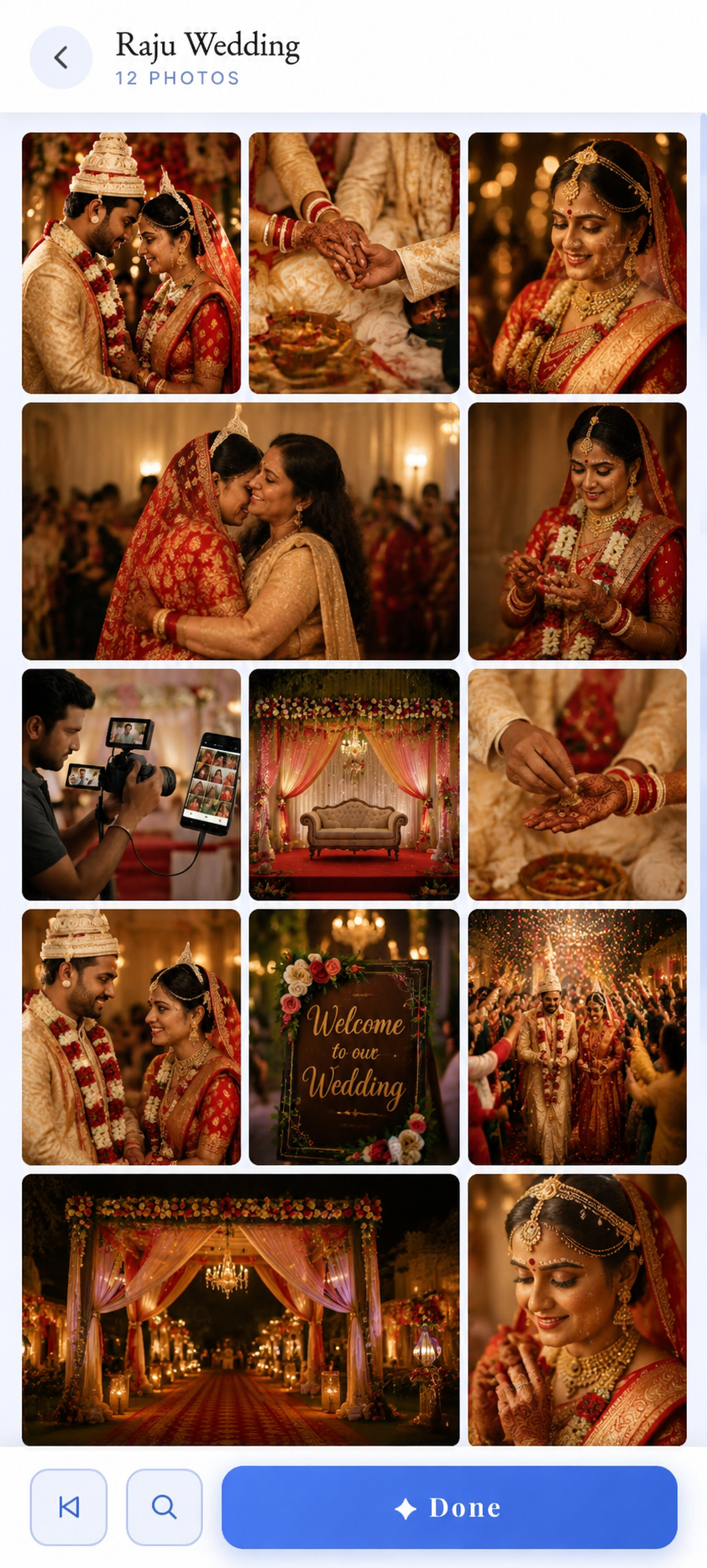
Your client taps the file, browses the set, marks favourites and can leave a short note on any photo. The file opens the app itself, or fetches it if it's missing.

Frame 06

Deliver

Their picks and notes land back in Creator Studio together. Export full-resolution originals in one go — your designer starts with everything attached.

ZCut Creator Studio desktop app
Your side — Creator Studio

Import a shoot, set your watermark, and export a .zalbum package — one screen, start to finish. See the full walkthrough →

ZCut Album app on a phone showing the import and photo selection screen
Their side — ZCut Album

Your client taps the file in WhatsApp, picks favourites, and adds notes — no install steps to explain. See the full walkthrough →

— Storage

Nothing leaves your machine

There's no cloud step in between. The shoot stays on your drive until you choose to send a .zalbum file yourself.

— Pricing

Free, full stop

Proofing, watermarking, client picks, notes and album handoff are all free — no account needed.

— Format

.zalbum opens in one place

The package format is built for this app specifically — it isn't a renamed ZIP a client can poke around in outside the proofing flow.

Individual Developer · Creator of ZCut

Tapajit Chakraborty

I build software for wedding and live-event photographers and videographers. zcut.in is my official website — the one home for every ZCut product: Studio Plus, ZCut Int and Creator Studio.

ZCut is an individual developer's brand, not a registered company.

Quick answers

Before you install

Ready when you are

Take your next live event to broadcast level

Free live switching, crew intercom and photo proofing — one developer, one website.

Get ZCut Studio Plus →